
3D Printer Stringing: Why Retraction Isn’t Always the Answer
Stringing is one of those 3D printing problems that gets reduced to a single piece of advice:
“Increase retraction.”
Sometimes that works.
Sometimes it makes almost no difference, because retraction was not the real problem in the first place.
Stringing happens when molten filament continues to ooze from the nozzle while the toolhead is travelling across an open area. The printer is no longer supposed to be extruding, but a fine strand of plastic gets pulled between two parts of the model.
The important word there is ooze.
Retraction helps control pressure at the nozzle before a travel move, but nozzle temperature, moisture, filament type, travel behaviour, nozzle contamination and hotend condition can all affect how much plastic wants to ooze.
If you immediately double the retraction distance every time you see a string, you can end up creating new problems while leaving the original cause untouched.
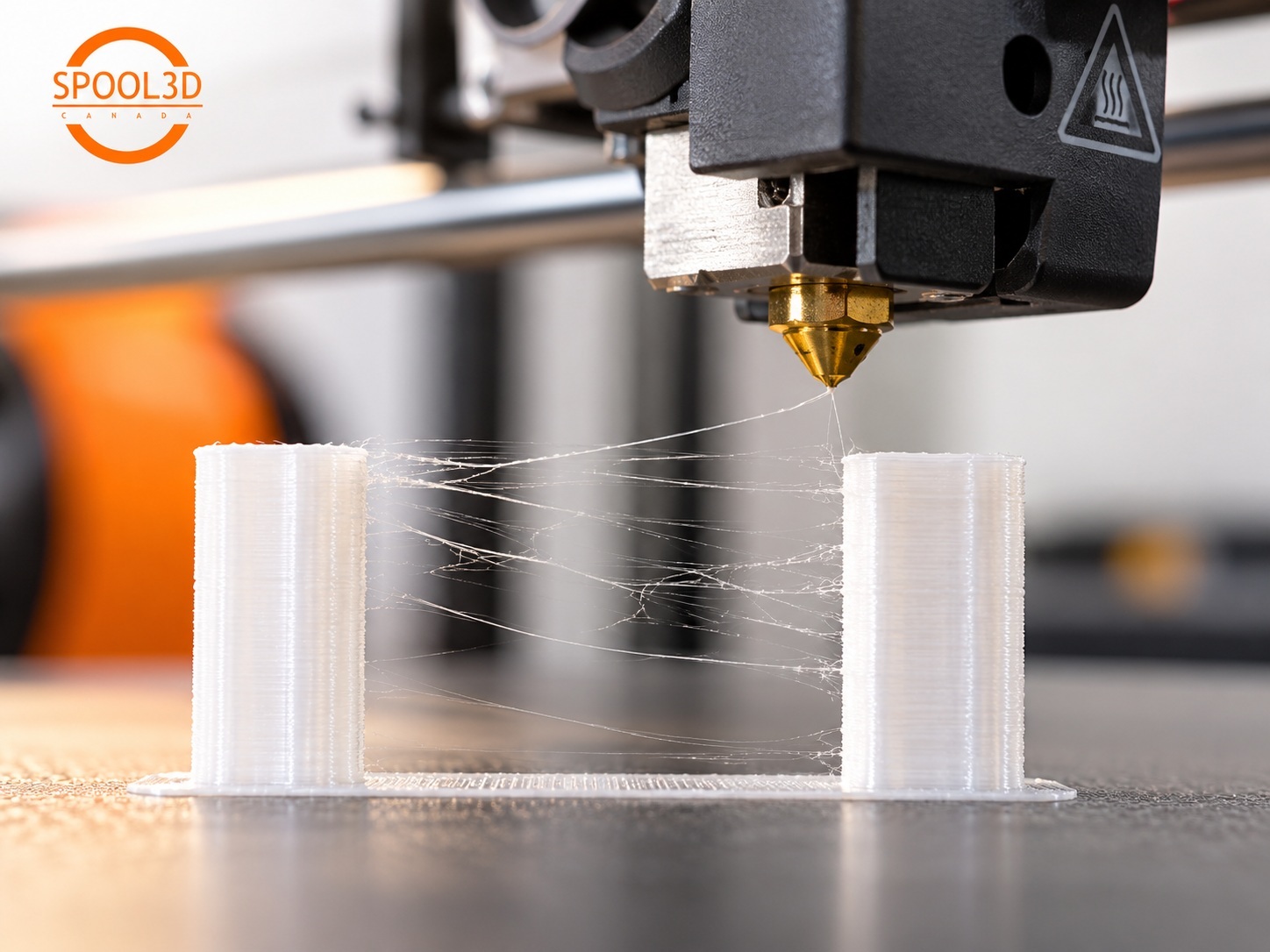
Start by identifying what kind of stringing you actually have
Not every unwanted strand means the same thing.
Fine, hair-like webs between features:
Typical stringing. Temperature, moisture, retraction and travel settings are the first places to look.
Thicker strands or blobs at the start and end of travels:
Pressure control, temperature and retraction behaviour become more likely.
Random wisps combined with popping or a rough surface:
Moist filament moves much higher on the list.
Plastic dragging from the outside of the nozzle:
The filament may not be coming through the nozzle opening at all. PETG and other sticky materials can accumulate on the nozzle and get deposited elsewhere in the print.
Strings only between separate objects, but almost none within one object:
Travel path and the number of open-air moves are probably contributing.
The pattern gives you more useful information than simply counting how many strings are present.
1. Check the filament before changing retraction
This is especially important with PETG, TPU, nylon and other materials that can absorb enough moisture to noticeably change print behaviour.
Water absorbed into filament turns to vapour as the filament enters the hotend. That can make extrusion less stable and increase oozing, fine hairs and surface defects.
Common signs include:
- Popping or crackling from the nozzle.
- A rougher surface than the same material normally produces.
- Small bubbles or inconsistent extrusion.
- Stringing that appeared even though the slicer profile did not change.
- A spool that printed well when new but has been sitting exposed for weeks or months.
Do not assume a bag of desiccant will dry filament that has already absorbed water. Dry storage helps slow moisture uptake; actively drying wet filament is a different process.
As a useful reference, Prusa currently recommends approximately 55°C for six hours for PETG and 60°C for four to six hours for TPU. Always check the filament manufacturer's recommendation and make sure the spool itself can tolerate the drying temperature.
If you are troubleshooting PETG filament and the spool has been exposed for a while, drying it before doing a large retraction calibration can save a lot of wasted tuning.
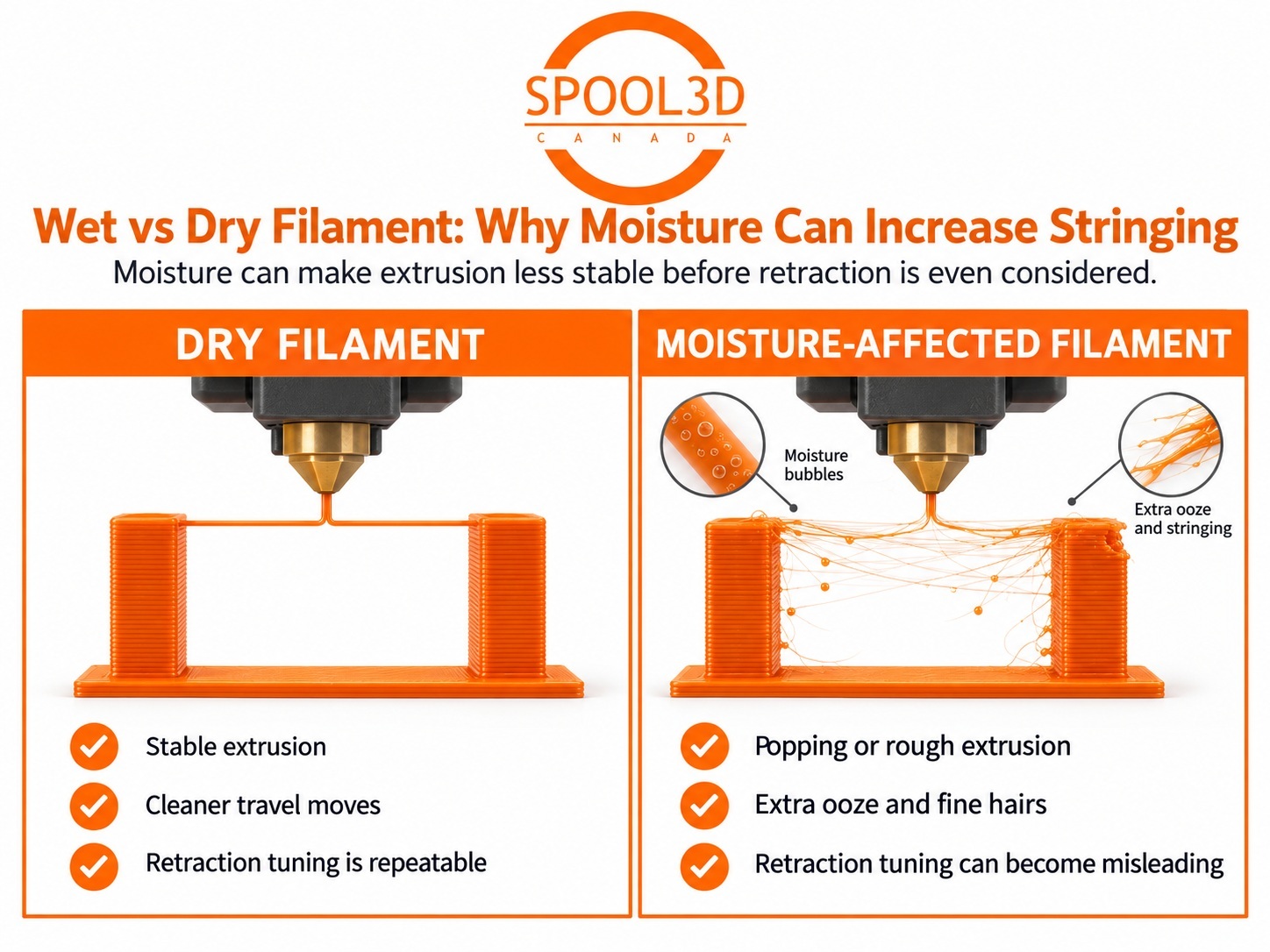
2. Make sure the nozzle is not simply too hot
Higher temperature lowers the viscosity of molten plastic. That is useful when you need more flow, stronger layer bonding or higher print speed.
It also makes it easier for plastic to leak from the nozzle during travel moves.
If a profile strings badly, try reducing nozzle temperature in small steps while watching for the point where print quality or layer bonding begins to suffer.
A change of 5–10°C is usually more useful for diagnosis than making a huge temperature jump.
Do not blindly copy a temperature from another printer. A filament that works at 230°C on one hotend may behave differently on another because heater design, thermistor placement, nozzle construction, print speed and volumetric flow are different.
Our 3D printing temperature guide is a starting point, not a substitute for tuning the material on the actual printer.
3. Understand what retraction can — and cannot — do
Retraction pulls filament backward before the nozzle travels across an area where it should not extrude.
The goal is not to suck all molten plastic out of the nozzle. It is to reduce pressure and limit the amount of material that can ooze during the travel move.
Two settings matter most:
- Retraction distance: how far the filament is pulled back.
- Retraction speed: how quickly that movement happens.
More is not automatically better.
Excessive retraction can cause:
- Delayed extrusion after travel moves.
- Gaps at the beginning of walls.
- Filament grinding.
- Additional wear in the filament path.
- Heat-creep problems on some hotend designs.
A direct-drive extruder and a long Bowden system also should not be expected to use the same retraction distance. A Bowden tube can flex and compress, so it often needs more filament movement to create the same pressure change at the nozzle.
Start from the printer manufacturer's profile before inventing a completely new number.
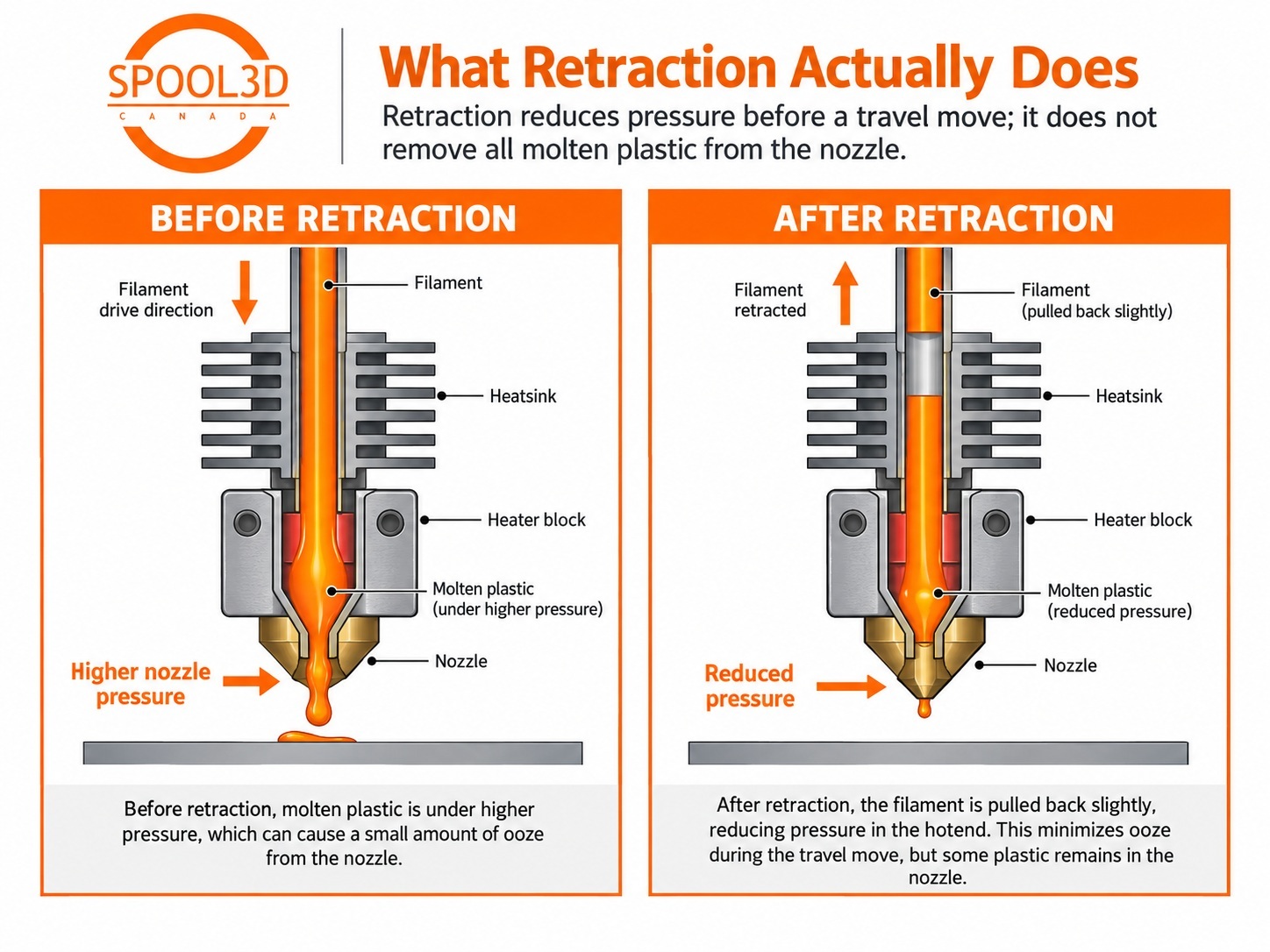
4. Do not tune retraction with wet filament
This deserves its own section because it wastes so much time.
If moisture is causing unstable extrusion and extra ooze, you can spend an hour changing retraction distance in 0.1 mm steps and still never get a clean result.
Worse, you may eventually settle on an excessive retraction value that seems to compensate for the wet spool.
Then you load dry filament and the profile is suddenly wrong.
Before doing a serious retraction test:
- Use filament that you know is dry.
- Use a known-good nozzle and hotend.
- Set a sensible temperature.
- Then tune retraction.
That way you are actually measuring retraction rather than trying to compensate for three unrelated variables.
5. PETG naturally tends to string more than PLA
PETG has many advantages for functional parts: good layer adhesion, toughness, useful temperature resistance and relatively low warping.
It is also more prone to oozing and stringing than typical PLA.
That does not mean a PETG print should look like it was covered in spiderwebs. It does mean that a profile producing absolutely clean PLA may still need adjustment for PETG.
For PETG, we would check these before pushing retraction to an extreme:
- Is the filament dry?
- Is the nozzle temperature higher than necessary for the current print speed?
- Is the nozzle exterior clean?
- Are travel moves crossing large open areas unnecessarily?
- Is the slicer using an appropriate PETG profile for the printer?
Spool3D carries PETG filament in solid, matte, translucent, tool colours, carbon-fibre blends and larger spool sizes. Whichever formulation you use, start with that product's own temperature recommendations rather than assuming every PETG wants the same settings.
6. Clean the outside of the nozzle
This is easy to overlook because technically it is not always “stringing” in the slicer sense.
PETG in particular likes to stick to hot metal.
If a thin coating of plastic builds up around the nozzle, that material can stretch into wisps, collect more plastic, and eventually get dragged across the print.
You may think material is leaking from the nozzle opening during travel when some of it is actually being pulled from plastic stuck to the outside.
With the printer at an appropriate service temperature, clean the nozzle using the procedure recommended for that hotend. Be careful around heater and thermistor wiring.
If a nozzle is worn, damaged or repeatedly accumulating material because its surface is in poor condition, Spool3D carries replacement 3D printer nozzles in a wide range of printer-specific sizes and materials.
7. Look at travel moves, not just extrusion settings
The printer can only create a string across a gap if the nozzle travels across that gap.
Modern slicers have several ways to reduce visible travel scars and stringing:
- Avoid crossing outer walls or perimeters when possible.
- Keep travel moves inside the printed part where practical.
- Use wiping behaviour during retraction.
- Choose travel paths that reduce open-air movement.
These settings can sometimes reduce visible stringing without changing the amount of retraction at all.
There is a trade-off. A longer travel path that stays inside the model can increase print time, and aggressive avoidance rules can occasionally create strange toolpaths. Use them deliberately rather than turning every avoidance option on at maximum strength.
8. Travel speed can matter, but it is not a magic number
The longer the nozzle spends travelling through open air, the more time it has to ooze.
A faster travel move can therefore reduce the time available for a string to form.
But increasing travel speed without considering the machine's motion limits can create ringing, missed steps or unnecessary mechanical stress.
If you are using the manufacturer's normal travel speeds on a modern printer, temperature, moisture and retraction usually deserve attention before trying to solve stringing by making the machine move dramatically faster.
9. TPU and very flexible filament are a special case
Soft filament stretches and compresses inside the feed path.
That means a commanded 1 mm retraction at the extruder does not necessarily create the same pressure change at the nozzle that it would with rigid PLA.
Flexible materials can therefore need different retraction behaviour, and very soft grades may dislike aggressive retraction altogether depending on the extruder design.
If you print TPU or other flexible filament, begin with a profile intended for that material and printer rather than copying PLA retraction values.
Keep the feed path as constrained and low-friction as practical, particularly with softer Shore A materials.
10. Check for a hotend problem if nothing else makes sense
If known-dry filament strings badly across multiple materials and normal profiles suddenly stop working, inspect the hardware.
Things worth checking include:
- Hotend components that were recently replaced or reassembled.
- A nozzle that is loose or not seated correctly for that hotend design.
- Heatbreak cooling problems.
- Plastic leaking from somewhere other than the nozzle opening.
- A damaged filament path.
Prusa's current stringing guidance even lists poor heat dissipation in the hotend as a possible contributor. That does not mean every stringy print has heat creep, but it is worth remembering that the slicer is not the only thing controlling the melt behaviour.
If the printer is also clicking, jamming or under-extruding, our articles on extruder clicking and skipping and heat creep in enclosed printers may point you toward the underlying problem.
Should you use a stringing test tower?
Yes — after the basics are under control.
A small two-post or multi-post stringing test is useful because it deliberately creates repeated travel moves across open air.
But calibration models are only useful if you change one variable at a time.
If you change temperature, retraction distance, retraction speed and travel speed between two prints, you have no idea which change actually helped.
A better order is:
- Dry or verify the filament.
- Choose the correct material profile.
- Find a reasonable nozzle temperature.
- Tune retraction distance.
- Fine-tune retraction speed if necessary.
- Then experiment with travel-path options.
Our troubleshooting order for a suddenly stringy print
- Ask whether anything changed: new spool, old spool, new nozzle, new profile or new hotend.
- Check the filament for moisture.
- Verify nozzle temperature.
- Clean the outside of the nozzle.
- Return to the printer manufacturer's normal retraction settings.
- Tune retraction in small steps using dry filament.
- Review travel paths and perimeter-crossing options.
- Inspect the hotend if several known-good materials suddenly behave badly.
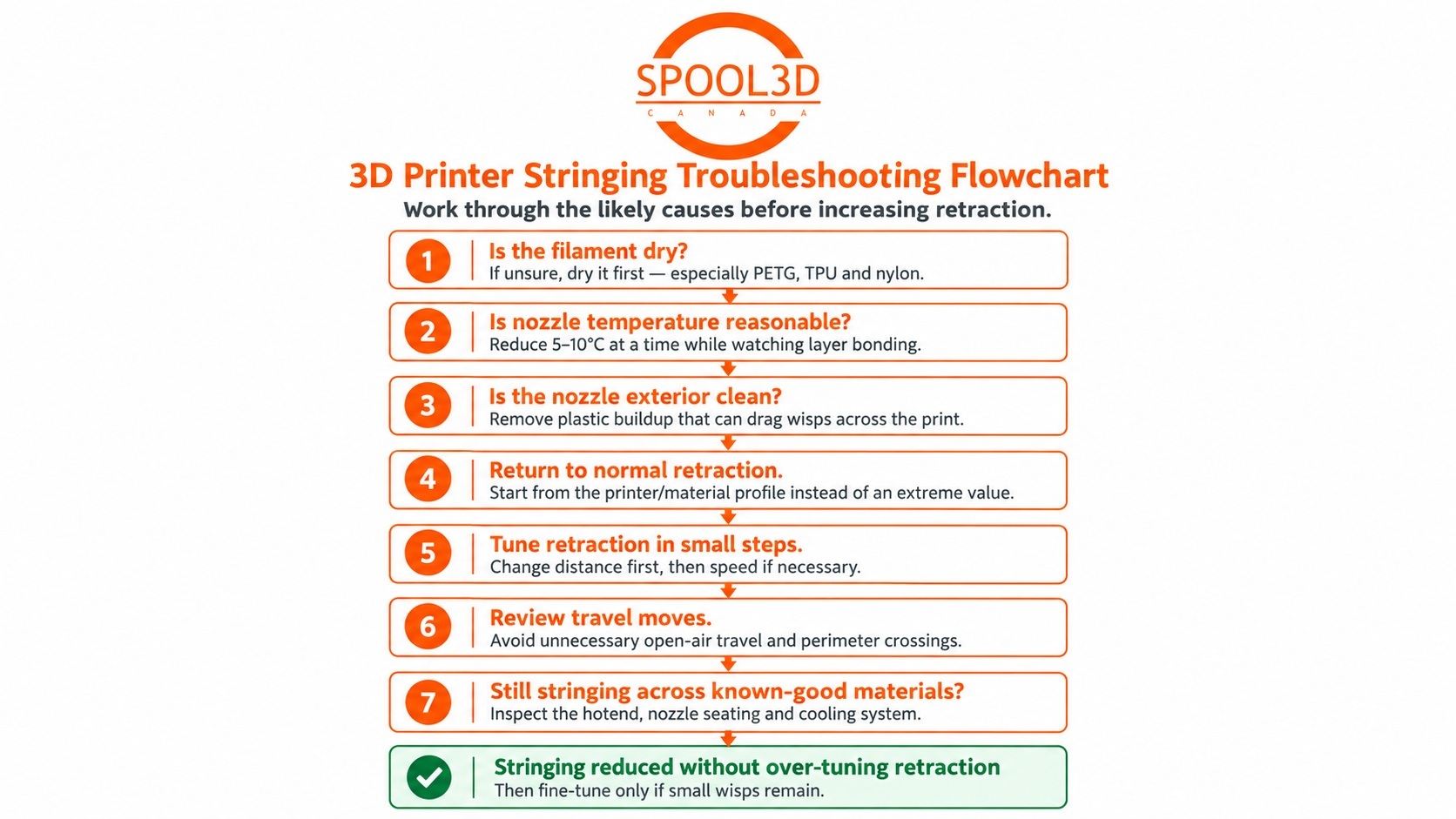
The important takeaway is that retraction is a pressure-management tool. It cannot dry wet filament, clean plastic off a nozzle, lower the melt temperature or repair a badly assembled hotend.
When stringing appears, fix the cause that is creating excess ooze first. Then use retraction to fine-tune what remains.
Spool3D carries 3D printer filament, replacement nozzles and extruder and hotend components. If a printer suddenly develops stringing along with jamming, leaking or inconsistent extrusion and you cannot isolate the hardware problem, our 3D printer repair service in Calgary can help diagnose supported machines.
Recent Posts
-
Fix Rough 3D Print Top Layers & Pillowing | Spool3D
The walls look good. The corners are clean. Then the printer reaches the top of the part and leave …October 14, 2026 -
3D Prints Splitting Between Layers? Causes & Fixes for Weak Layer Adhesion
A 3D print can have a smooth surface, tidy corners and a clean top layer, then split the first time …October 08, 2026 -
3D Printer Under-Extrusion: Causes, Fixes & Troubleshooting
Under-extrusion happens when your 3D printer deposits less plastic than the slicer expects. The res …October 06, 2026