
3D Printer Extruder Clicking or Skipping? Causes & Fixes
An extruder that starts clicking, ticking or skipping is usually telling you one thing: it is having trouble moving filament.
That does not automatically mean the extruder is bad.
The drive system is trying to push filament toward the nozzle, but something downstream is creating more resistance than it can overcome. Depending on the printer, the sound may be the stepper motor skipping, the drive gears slipping on the filament, or the filament being repeatedly grabbed and released.
The useful question is not “Why is my extruder clicking?” It is:
What is making the filament so difficult to move?
Work through the checks below in order and you can usually narrow the problem down without replacing parts at random.
1. Stop the print before the extruder chews through the filament
If the extruder is clicking continuously and little or no filament is coming out, do not let it grind away for another hour.
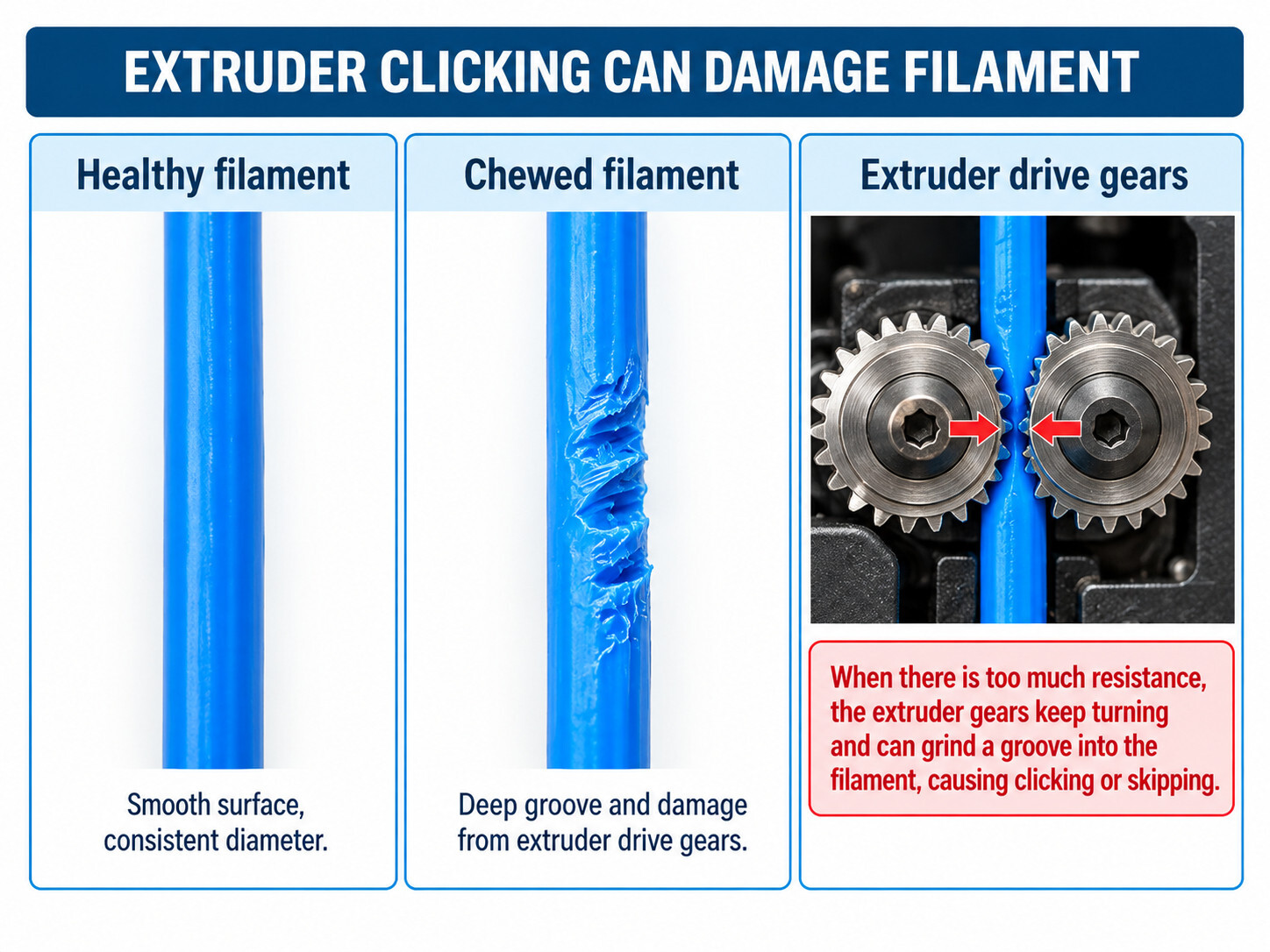
Drive gears are designed to bite into the filament. If the filament cannot move forward, those same teeth can eventually machine a deep groove into it. Once that happens, even after the original restriction is cleared, the gears may no longer be able to feed the damaged section.
Pause or stop the print, unload the filament if the printer allows it, and inspect the section that was sitting in the extruder.
Look for:
- A deep notch or flattened section where the drive gears were gripping.
- Heavy filament dust around the gears.
- A swollen or deformed end.
- A sharp step or enlarged section at the end of the filament.
If the filament is badly chewed, cut back to an undamaged section before reloading it. Cleaning the gears may also be necessary before testing again.
2. Pay attention to when the clicking happens
The timing of the problem can tell you a lot.
Clicks while loading or purging filament:
Suspect a restricted filament path, clogged hotend, incorrect temperature, damaged filament end or a problem inside the extruder.
Clicks only during the first layer:
Check whether the nozzle is too close to the build plate. If there is almost no space for plastic to leave the nozzle, pressure can build rapidly in the hotend.
We covered first-layer height in 3D Printer First Layer Not Sticking? 7 Things to Check.
Clicks only during fast sections of a print:
Look at volumetric flow. The printer may simply be asking the hotend to melt plastic faster than it can.
Clicks after the printer has been running for a while:
Heat creep becomes more plausible, especially with PLA in an enclosed printer or if hotend cooling is compromised.
Clicks only with one spool or one material:
Check the filament diameter, spool drag, path resistance, print temperature and whether that material is appropriate for the current extruder setup.
This is why listening to when the clicking starts is more useful than immediately tightening the extruder.
3. Make sure the spool and filament path can move freely
Before taking the hotend apart, check the easy stuff.
The extruder should not have to fight the spool before it even reaches the toolhead.
Check for:
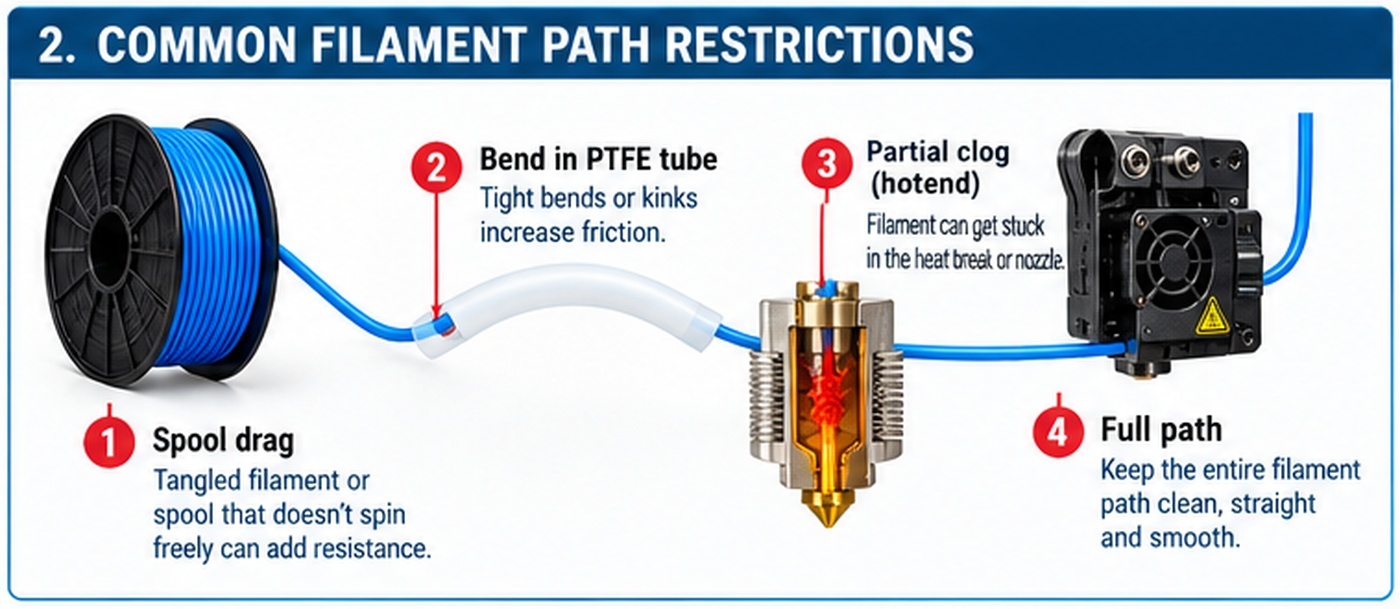
- A tangled or crossed-over filament loop on the spool.
- A spool rubbing against the holder or enclosure.
- A cardboard spool that is damaged or no longer rolling smoothly.
- A PTFE tube with a sharp bend or kink.
- A tube that is not fully seated in its fitting.
- Debris inside the filament path.
- Excessive resistance through a multi-material feeder or external spool system.
A PTFE tube is supposed to guide filament with relatively low friction. A damaged, crushed or sharply bent tube can add enough drag to turn a marginal extrusion problem into repeated skipping.
Spool3D carries replacement PTFE tubing and filament-path fittings for many printer configurations.
If practical on your printer, disconnect the filament path ahead of the extruder and verify that the spool feeds freely by hand. Do not force filament through a cold hotend.
4. Confirm that the nozzle temperature makes sense for the material
Plastic becomes harder to push when it is not melting quickly enough.
If PLA that normally prints cleanly at 215°C is accidentally being printed with a much colder profile, the extruder may have to generate far more pressure to maintain the requested flow. The same principle applies to PETG, ABS, ASA, nylon and other materials, although their normal temperature ranges are different.
If the problem appeared after changing filament or loading a custom profile, verify the material and nozzle temperature before changing hardware.
Our 3D printing temperature guide is a useful starting point, but the filament manufacturer's recommended range and the printer's own profile should take priority when available.
If you have been experimenting with profiles, temporarily return to a known-good preset. That gives you a baseline before you start tuning around the problem.
Sometimes slicer software defaults to a wrong type of filament. Generic PLA cannot be printed as high speed PLA or silk PLA. Silk and reguklar PLA require slower, hotter temperatures to print.
5. Check whether you are asking for more flow than the hotend can deliver
This one is easy to miss on modern high-speed printers.
A printer can move the toolhead at 300 mm/s without necessarily being able to melt enough plastic to support every combination of speed, layer height and extrusion width at 300 mm/s.
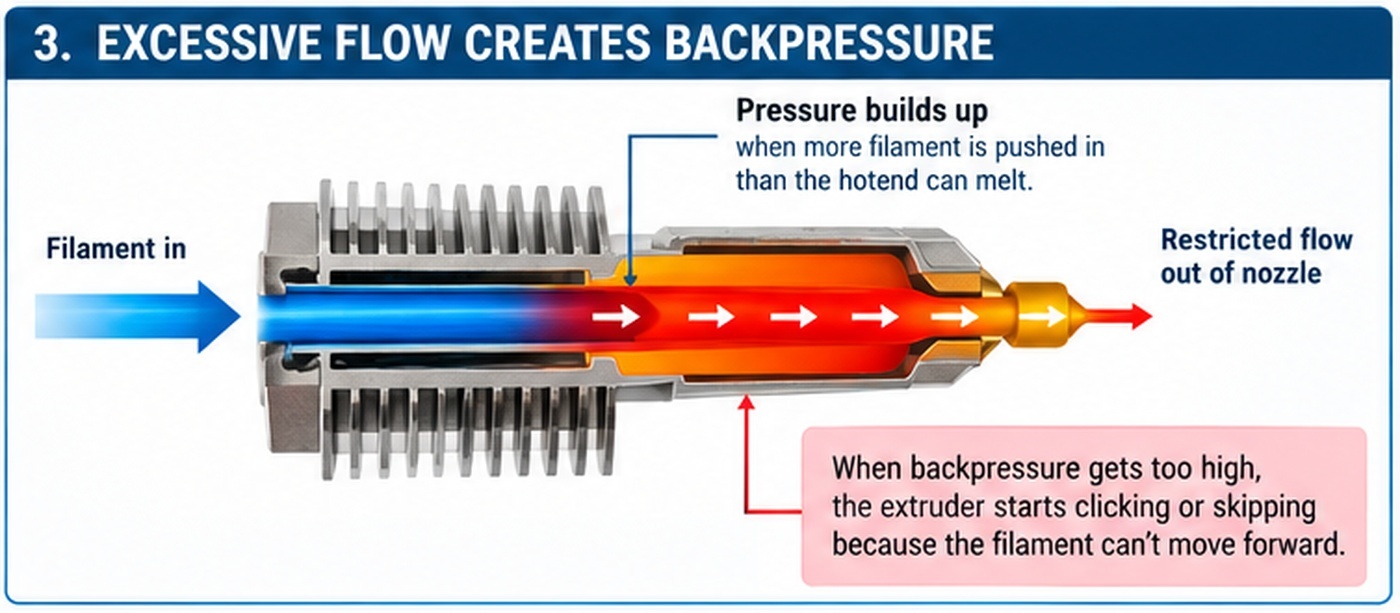
The hotend has a maximum practical melt rate. Once the requested volumetric flow exceeds that capacity, pressure inside the melt zone rises, extrusion becomes inconsistent, and the extruder may eventually start skipping.
That is why clicking that only happens on fast infill, thick layers or a larger nozzle can be very different from clicking during a slow purge.
As a simplified example:
0.20 mm layer height × 0.45 mm extrusion width × 200 mm/s = 18 mm³/s
Change to a 0.30 mm layer and 0.65 mm extrusion width at the same speed:
0.30 × 0.65 × 200 = 39 mm³/s
The motion speed did not change, but the amount of plastic the hotend is being asked to melt more than doubled.
We explain this in more detail in Why Maximum Volumetric Flow Matters More Than Print Temperature in 3D Printing.
If clicking disappears when you slow the print or reduce volumetric flow, do not assume the extruder suddenly repaired itself. You may simply have brought the extrusion demand back within the hotend's capability.
6. Rule out a partial nozzle or hotend restriction
A clog does not have to stop extrusion completely.
A partial restriction can still allow filament through while increasing the pressure required to push it. That can produce several symptoms at once:
- Extruder clicking or skipping.
- Thin or inconsistent extrusion.
- Missing lines or weak layers.
- Filament that curls sharply as it exits the nozzle during a purge.
- Grinding marks on the filament.
Also remember that the blockage may not actually be inside the nozzle opening. Depending on the hotend design, a restriction can occur higher in the melt path, around an internal PTFE section, in the heatbreak, or where softened filament has deformed inside the hotend.
That is why replacing the nozzle is not a guaranteed fix for every clog.
If your printer supports a manufacturer-recommended cold pull or cleaning procedure, that can be useful for some partial restrictions. Follow the instructions for the specific hotend. Modern integrated hotends and quick-swap nozzle assemblies are not all serviced the same way.
If replacement is necessary, Spool3D carries 3D printer nozzles and replacement hotends for a wide range of printer models.
7. Consider heat creep if the failure happens after printing for a while
Heat creep is a particular type of filament-path restriction.
The hotend is designed to have a hot melt zone near the nozzle and a much cooler region above it. If too much heat travels upward, filament can begin softening where it is supposed to remain solid.
Once that softened filament expands or deforms inside the upper hotend, it becomes difficult for the extruder to push. The result can be under-extrusion, a jam, grinding and the familiar clicking sound.
Things that can contribute include:
- A failed, dirty or obstructed hotend heatsink fan.
- Printing low-temperature material in a very warm enclosure.
- Restricted airflow around the hotend.
- An incorrectly assembled hotend.
- Excessive retraction or another printer-specific filament-path issue.
PLA can make this especially noticeable in enclosed printers because it softens at a comparatively low temperature.
If the printer loads and purges normally when cold, prints correctly for a while, then starts clicking later in the job, heat creep deserves a closer look.
We will cover heat creep in detail in a separate troubleshooting article rather than trying to turn it into a one-paragraph fix.
8. Inspect the extruder gears — after you have checked the resistance downstream
Sometimes the problem really is in the extruder.
Remove filament according to the printer manufacturer's procedure and inspect the drive system if it is accessible.
Look for:
- Filament dust packed into the gear teeth.
- Worn or damaged drive teeth.
- A gear that has moved out of alignment with the filament path.
- A loose gear or fastener.
- A cracked or damaged extruder component.
- An idler that is not applying the correct pressure.
Do not assume that “more tension” is automatically better.
If idler pressure is too low, the gears may slip. If it is unnecessarily high, the gears can deform softer filament, increase drag or make flexible materials harder to feed. Use the printer or extruder manufacturer's adjustment procedure rather than tightening until the screw stops moving.
If the gear teeth are full of plastic dust, clean them before diagnosing anything else. A drive gear cannot grip properly if its teeth are packed with material from the last failed feed.
Spool3D carries extruders, drive gears and filament-feed components for many common 3D printers.
9. Do not overlook the filament itself
If the printer works perfectly with three spools and clicks with a fourth, pay attention to the spool.
Check whether the filament:
- Feeds smoothly through the tubing and extruder.
- Has an unusually large or inconsistent diameter.
- Has become brittle.
- Has a damaged or flattened section.
- Requires a different temperature or flow profile.
- Is soft enough that the drive gears are deforming it.
Flexible filaments deserve special attention because they can buckle or deform in gaps that rigid filament passes through without trouble. A feed path that works perfectly with PLA may still be unsuitable for very soft TPU.
Moisture can also contribute to poor extrusion with some materials, but “dry the filament” should not become a universal answer to every clicking extruder. If there is a hard mechanical blockage, drying the spool will not remove it.
What the clicking sound is actually telling you
Think of the extruder as the part applying force and the hotend/filament path as the load resisting that force.
If the resistance becomes too high, something has to give.
That may be:
- The motor losing steps.
- The gears slipping over the filament.
- The filament being ground away.
- Extrusion slowing or stopping.
The noise is therefore a symptom of excessive resistance or insufficient grip. It is not a diagnosis by itself.
The order we would troubleshoot it
- Stop the print before the filament gets completely ground away.
- Notice when the clicking occurs: loading, first layer, high-speed sections or later in the print.
- Check the spool, PTFE tubes and entire filament path for drag.
- Verify the correct material profile and nozzle temperature.
- Reduce print speed or volumetric flow and see whether the symptom changes.
- Check for a partial nozzle or hotend restriction.
- Consider heat creep if the problem appears after the printer has been hot for a while.
- Inspect and clean the extruder gears and verify idler adjustment.
- Compare with another known-good spool if the problem remains material-specific.

The main thing is to avoid replacing the extruder just because the sound is coming from the extruder.
A new extruder will make exactly the same unhappy clicking noise if it is being asked to push filament through a blocked hotend.
If you have worked through the filament path, settings, hotend and drive system and still cannot isolate the problem, Spool3D offers 3D printer repair service in Calgary. We can diagnose extrusion problems, clogged hotends, failed extruders and other feed-system issues on supported printers.
Recent Posts
-
Fix Rough 3D Print Top Layers & Pillowing | Spool3D
The walls look good. The corners are clean. Then the printer reaches the top of the part and leave …October 14, 2026 -
3D Prints Splitting Between Layers? Causes & Fixes for Weak Layer Adhesion
A 3D print can have a smooth surface, tidy corners and a clean top layer, then split the first time …October 08, 2026 -
3D Printer Under-Extrusion: Causes, Fixes & Troubleshooting
Under-extrusion happens when your 3D printer deposits less plastic than the slicer expects. The res …October 06, 2026