
Formlabs Form Studio 1 Resin 3D Printer | Canada
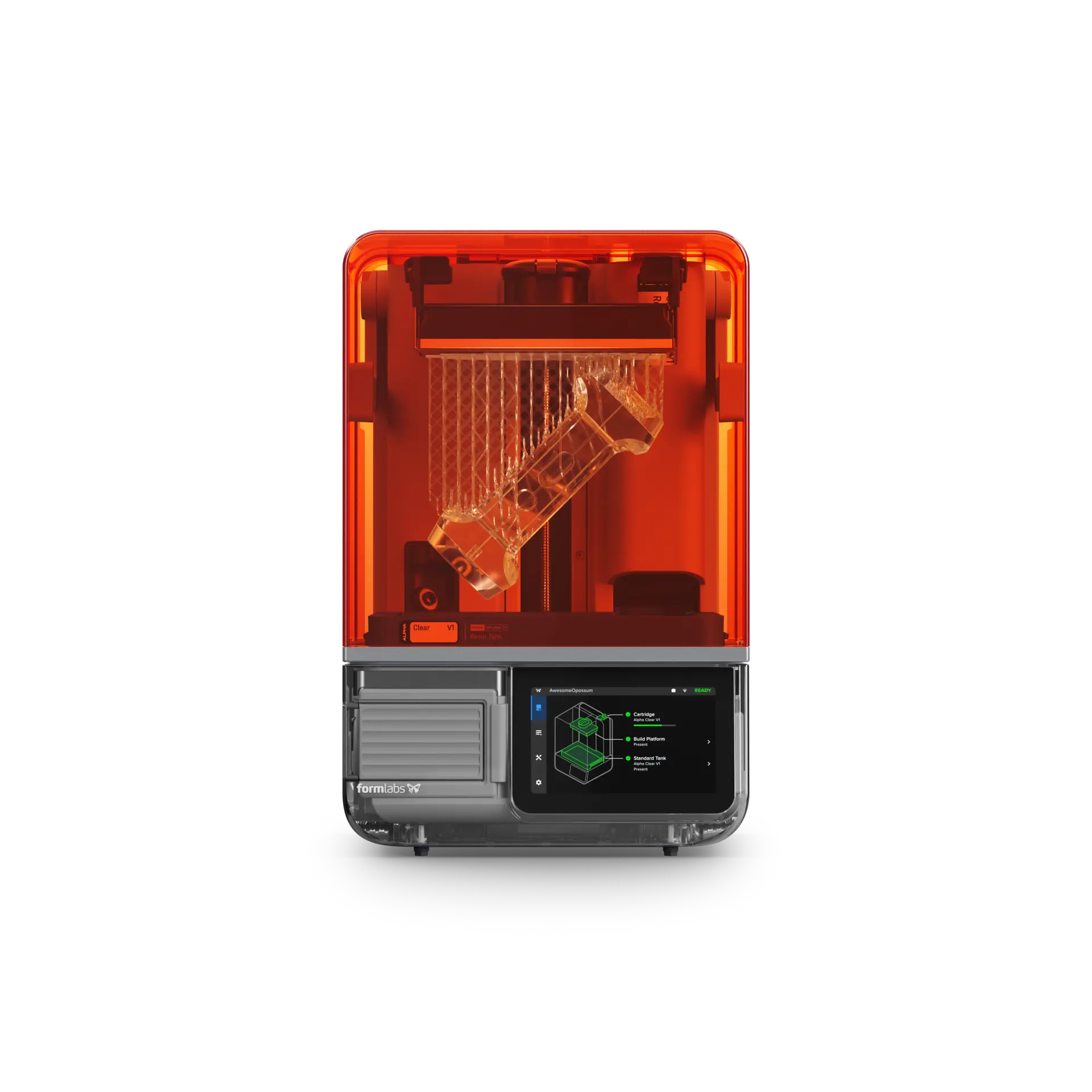
Designed for creators, engineers and educators
Detailed resin parts without the complicated workflow
Form Studio 1 uses Formlabs Low Force Display (LFD) masked stereolithography technology, automatic resin handling and validated materials to simplify desktop resin printing.
Most parts in under two hours
Accelerate iterations with rapid, consistent printing. Actual speed depends on material, geometry and layer settings.
Sharp detail and smooth finishes
A 35 µm pixel size, refined anti-aliasing and low print forces help preserve miniature details and accurate assemblies.
A streamlined resin workflow
Enjoy automated resin dispensing, a seven-inch touchscreen, an integrated camera and easy print setup using PreForm.
Built for your workspace
More confidence in everyday resin printing
Alpha Resins are formulated for low odor and professional part quality. Pair Form Studio 1 with the Formlabs VOC Extractor and Alpha Resins for the manufacturer’s UL GREENGUARD Gold-certified low-emissions configuration.
- Sealed print chamber and spill-resistant resin tank
- PreForm software for automatic orientation and support generation
- Remote print monitoring through Formlabs Dashboard and Form Mobile
- Open Material Mode included for compatible third-party 405 nm resins
Certification is specific to the printer + Alpha Resins + VOC Extractor combination. Resin handling still requires appropriate personal protective equipment, ventilation and washing/curing procedures.
From file to finished part
1. Prepare
Import a model into the included PreForm software, orient it and generate supports.
2. Print
Choose your supported resin and start a job with automated dispensing when using compatible Formlabs cartridges.
3. Wash and cure
Remove uncured resin and UV-post-cure your prints with Form Studio Wash+Cure or compatible Formlabs equipment.
Choose your workflow
Form Studio 1 printer configurations
Start with the printer, upgrade to easier part removal, or build a complete resin printing station. Confirm final local package names, contents and pricing before publishing product purchase links.
Founders Edition color options include Graphite, Aqua, Teal and Violet; the color availability and exact SKUs vary by configuration and region. The approved AMER Founders Edition SKU for Basic Graphite is FST1-BASIC-US. Flex options include FST1-FLEX-US (Graphite), FST1-FLEX-BL-US (Aqua), FST1-FLEX-TL-US (Teal), and FST1-FLEX-PU-US (Violet).
Designed for great results
Explore Form Studio 1 Alpha Resins
Six materials developed for this printer offer a range of appearances and performance characteristics.
Alpha Grey
Matte grey resin for concept models, fit checks and detailed functional prototypes.
Alpha White
Clean, matte white for detailed presentation models and prototypes.
Alpha Black
Deep black with smooth surfaces for refined presentation-ready parts.
Alpha Clear
Transparent resin for lighting models, enclosures and see-through components.
Alpha Model
Detailed miniatures, sculpture and scale models with a neutral, highly matte finish.
Alpha Fast
Fast-turnaround prototypes, tooling and fixtures; up to 130 mm/h in supported settings.
Additional validated materials include Tough 1500 Resin V2, Flexible 80A Resin V2 and True Cast Resin. Check tank compatibility before printing.
Expand your setup
Recommended equipment and accessories
- Form Studio Wash+Cure: compact all-in-one solvent washing and 405 nm UV curing.
- VOC Extractor: dual carbon filters and three airflow settings; required for the stated GREENGUARD Gold configuration.
- Build Platform Flex: quick-release surface for tool-free removal.
- Extra resin tank: dedicate one tank per resin or color to speed changeovers.
- Resin Tank Pro: required for Tough 1500 Resin V2 and third-party Open Material Mode resins.
Important material compatibility
Standard Resin Tank: compatible with Alpha Resins, Flexible 80A Resin V2 and True Cast Resin.
Resin Tank Pro: choose for Tough 1500 Resin V2 or resins requiring Open Material Mode.
Third-party resins require manual filling and development of suitable print settings; third-party slicers are not supported. Use Formlabs PreForm.
Technical details
Form Studio 1 specifications
Frequently asked questions
Form Studio 1 FAQs
Does Form Studio 1 require washing and curing?
Yes. Resin prints must be washed to remove uncured resin, then appropriately UV-cured. The optional Form Studio Wash+Cure handles both steps.
Can I use third-party resin?
Yes, with Open Material Mode and the Form Studio 1 Resin Tank Pro. Third-party materials are manually dispensed and require suitable settings. Resin must be compatible with the printer’s 405 nm technology.
Does the printer work with third-party slicers?
No. Form Studio 1 uses Formlabs PreForm for slicing and print preparation.
Is the printer itself UL GREENGUARD Gold certified?
The certification applies to the complete Form Studio 1, Alpha Resin and VOC Extractor combination, not every possible material or operating setup.
Which build platform should I choose?
The standard aluminum build platform is a straightforward starting point. Build Platform Flex adds quick-release part removal and is especially helpful when printing frequently.
READY TO SHOP?
Shop Form Studio 1 at Spool3D
Find your printer, choose compatible resin, and add the parts needed for your workflow.
Form Studio 1 printers
Browse Formlabs resin printers and select a Form Studio 1 configuration.
SHOP PRINTERS →Standard Alpha V1 Resin
Shop Form Studio 1 resin in Grey, White, Black and Clear.
SHOP ALPHA RESIN →Parts & accessories
Find resin tanks, build platforms and other Form Studio 1 accessories.
SHOP PARTS →Available through Spool3D · Canada
Ready to explore Form Studio 1?
Contact Spool3D for current Canadian pricing, package availability and assistance choosing resin and post-processing equipment.