
Bambu Lab
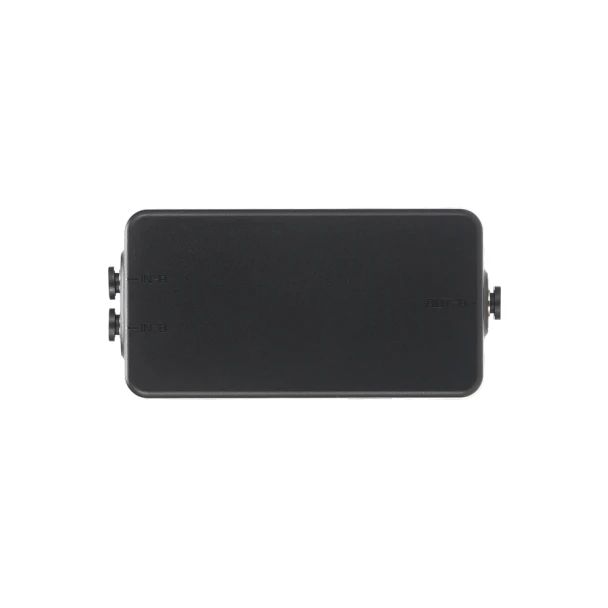
Bambu Lab Filament Track Switch
- SKU:
- BAMBU-TRACKSWITCH-SA016
- UPC:
- 6937285513762
- MPN:
- SA016

Description
Free shipping in Canada for qualifying orders over $140 before tax.
The Bambu Lab Filament Track Switch is a genuine OEM accessory for compatible Bambu Lab dual-nozzle printers. It removes the fixed connection between an AMS and a specific nozzle, allowing the printer to dynamically route filament to the left or right hotend according to the filament mapping selected in Bambu Studio.
This added routing flexibility can reduce the need to manually move filament spools between AMS units when preparing multi-colour or multi-material prints. With the Filament Track Switch installed, compatible printers can automatically select the appropriate filament path and nozzle as required by the print configuration.
Genuine Bambu Lab part SA016 includes the Filament Track Switch, 6-pin cable, four PTFE tubes, and mounting screws. It is currently compatible with the Bambu Lab X2D, H2D, and H2C.
- Eliminate Manual Filament Re-grouping
- Dynamic Mapping for Peak Efficiency
1. After installing the Filament Track Switch, the number of AMS units that can be connected depends on the printer's supported AMS expansion limit. Please refer to the official specifications of the corresponding printer model for details.
2. For dual-nozzle printers (such as the X2D), a single AMS can still support dual-nozzle printing and enable filament switching between the left and right hotends when used with the Filament Track Switch. However, when only one AMS is connected, the left and right hotends support alternate feeding only, not simultaneous feeding. During switching, the AMS must first unload the filament and then reload it.
Overview
Eliminate Manual Filament Re-grouping
Dual-extrusion 3D printers significantly accelerate multi-color printing by reducing the flushing time required by single-extrusion machines. Traditionally, ensuring filaments reached the correct nozzle required manually swapping spools between AMS units. With the Filament Track Switch, those days are over. It intelligently routes any filament from your AMS units to whichever nozzle the slicer assigns, giving you total hardware flexibility and faster prints.
Dynamic Mapping for Peak Efficiency
The filament track switch unbinds the AMS from specific nozzles, allowing any filament to feed into any nozzle regardless of configuration. This enables dynamic filament mapping, permitting mid-print color reassignments that significantly boost multi-color efficiency.
Installation
Please refer to the installation guide for the Filament Track Switch available on Bambu Lab Wiki. For a visual walkthrough, we also recommend watching the step-by-step installation video.
In the Box
- Filament Track Switch x 1
- 6-pin Cable x 1
- PTFE Tube (700 mm) x 2
- PTFE Tube (400 mm) x 2
- ST3x10 Screws x 4
- BT2x8 Screws x 2
Compatibility
- Bambu Lab X2D
- Bambu Lab H2D
- Bambu Lab H2C
FAQ
1. When the filament track switch is installed on the X2D printer, how many AMS units can be connected at most?
A: The number of AMS units the printer can connect to is independent of whether the filament track switch is installed, so the X2D supports up to 4 AMS 2 Pro and 8 AMS HT units simultaneously—12 units with 24 slots in total—linked via the 4-in-1 PTFE adapter.
2. Can the 4-in-1 PTFE adapter be used when only two AMS units are connected?
A: Using the 4-in-1 PTFE adapter with just two AMS units is strongly discouraged; the extra resistance during loading and unloading can compromise print reliability.
3. Can the filament track switch be connected to an external spool?
A: No. When using an external spool, it will permanently occupy one extruder channel, making the filament track switch unable to dynamically map filament from the AMS to the two extruders. Therefore, if you need to print with an external spool, you need to remove the filament track switch.
4. Are there filament restrictions when printing with the filament track switch?
A: Certain filaments—such as PLA-CF, PLA Glow, and PLA Silk—are more sensitive to feed resistance and may fail to load or unload. Avoid using these filaments through the switch. If problems occur and printing must continue, try:
-
- Manually moving the problematic filament to another AMS slot;
- Using the officially recommended PTFE tube length;
- Arranging the AMS units as advised in the official guidelines.
If issues persist, disable the filament track switch for the current print job.
5. What should I do if the filament track switch is clogged?
A: If the filament track switch is clogged, please refer to filament track switch disassembly and troubleshooting guide to clear the clog.
6. What should I do if the filament gets stuck at the filament track switch outlet?
A: If the filament gets stuck at the filament track switch outlet, you can try the following solutions:
-
- Reconnect the PTFE tube between the filament track switch and the filament buffer.
- Install the pneumatic connector locking tab on the filament track switch outlet.
- Replace the PTFE tube between the filament track switch and the filament buffer.
7. Can the printer perform calibration when using the filament track switch?
A: Currently, after installing the filament track switch on the X2D, high-precision nozzle offset calibration cannot be performed. To run this calibration, you must first remove the switch and restore the printer to its state without the switch. A future firmware update will resolve this limitation.
OEM Bambu Lab Filament Track Switch dynamically routes AMS filament between dual nozzles on X2D, H2D and H2C for flexible multi-colour printing.
Related Products
Related Products

Bambu Lab Filament Buffer
Bambu Lab

Bambu Lab Filament Cutter Lever
Bambu Lab

Bambu Lab Filament Buffer - P2S
Bambu Lab

Bambu Lab Filament Buffer - H2D
Bambu Lab
Bambu Lab Replacement Filament Cutter - P2S
Bambu Lab

Bambu Lab AMS Lite Filament Hub
Bambu Lab